How to Update GB WhatsApp App Without Losing Chats
How to Update GB WhatsApp Latest v 18.80
Hello, GB WhatsApp users! The new version 18.80 of GB WhatsApp was released in the last week of January 2026. It offers exciting features, improved safety and security updates, and new themes. But are you stuck on an old version because you’re scared of losing your chats? Don’t worry! I’ll show you how to upgrade GB WhatsApp version easily without losing any messages.
Why Update GB WhatsApp?
Updating GB WhatsApp is important as it:
- Introduces new features
- Enhances privacy
- Improves security to prevent bans
- Offers new themes for visual changes
- Fixes bugs for smoother performance
How to Update GB WhatsApp Without Losing Chats
There are three methods available to update your GB WhatsApp old versions to the new versions:
- Update GB WhatsApp via trusted website
- Update GB WhatsApp via the old app
- Update GB WhatsApp through Google search
The first two methods are valid and easy to update your app, but the third method is difficult and risky because new users are unable to find an authentic and trusted source to download the APK file.
Create and Save Backup Before Update
Before starting the update process, it’s important to back up your WhatsApp data to avoid losing anything. Follow these steps:
- Open GB WhatsApp on your phone.
- Tap the three dots > Settings > Chats > Chat Backup.
- Tap BACK UP to save chats to your phone.
- Open your File Manager and check this folder: Internal Storage > GBWhatsApp > Databases.
- Look for a file like msgstore.db.crypt14 and save it.
- Copy the whole GBWhatsApp folder to your computer for extra safety.
After saving backup files, you can now update your GB WhatsApp to the new version.
Update GB WhatsApp via Trusted Website
- Visit a trusted site like GBWhsapp.net.
- Download the version 18.80 APK.
- Go to Settings > Security > Install unknown apps, and allow your browser or file manager to install apps.
- Go to Settings > Apps > GB WhatsApp > Uninstall the old version.
- Open Downloads and tap the APK file.
- Install it and allow any necessary permissions (such as storage access).
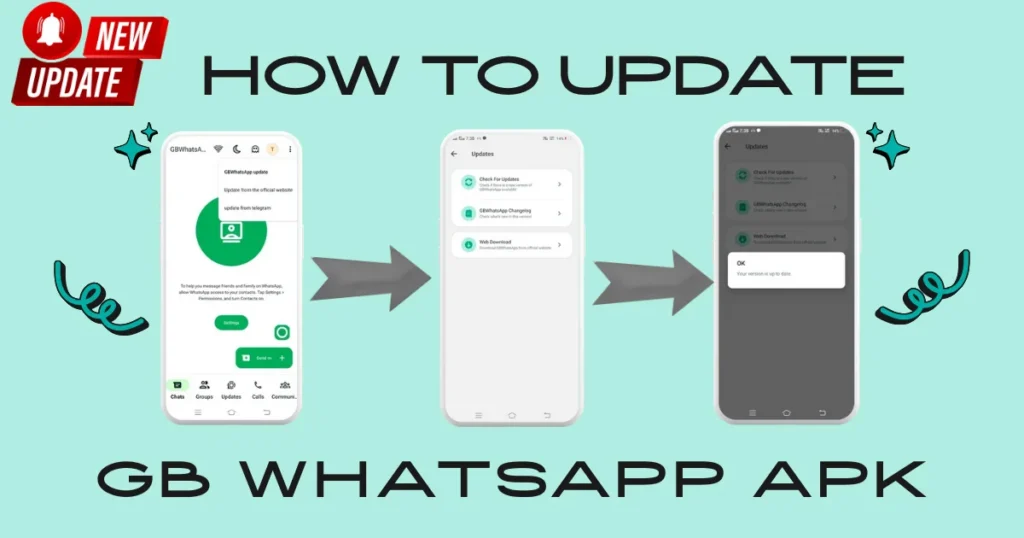
Update GB WhatsApp Through the Old App
- Open GB WhatsApp.
- Tap the three dots in the top right corner.
- Go to GBSettings > Updates.
- Tap Check for Updates.
- If a new version is available, tap it to begin the update.
Update GB WhatsApp Through Google Search
This method can be challenging for new users. Here is a breakdown of its steps:
- Go to Google.com
- Search GB WhatsApp v18.80.
- Visit trusted sources.
- Download the APK file from it.
- Install APK to use its latest features.
Conclusion
Upgrading to GB WhatsApp v18.80 is easy and safe. You will receive new features, enhanced privacy, and improved security. Plus, there are new themes to enjoy! Make sure to back up your chats first to keep them safe. Use a trusted site like GBWhsapp.net or update through the app. Avoid Google searches, as they may lead to unsafe sources. Follow the steps, save your backup, and enjoy the new GB WhatsApp without any worries!